> ## Documentation Index
> Fetch the complete documentation index at: https://docs.tentacle.app/llms.txt
> Use this file to discover all available pages before exploring further.
# Introduction
> Welcome to the Tentacle documentation. We are thrilled to guide you through your first steps with Tentacle.
### What is Tentacle?
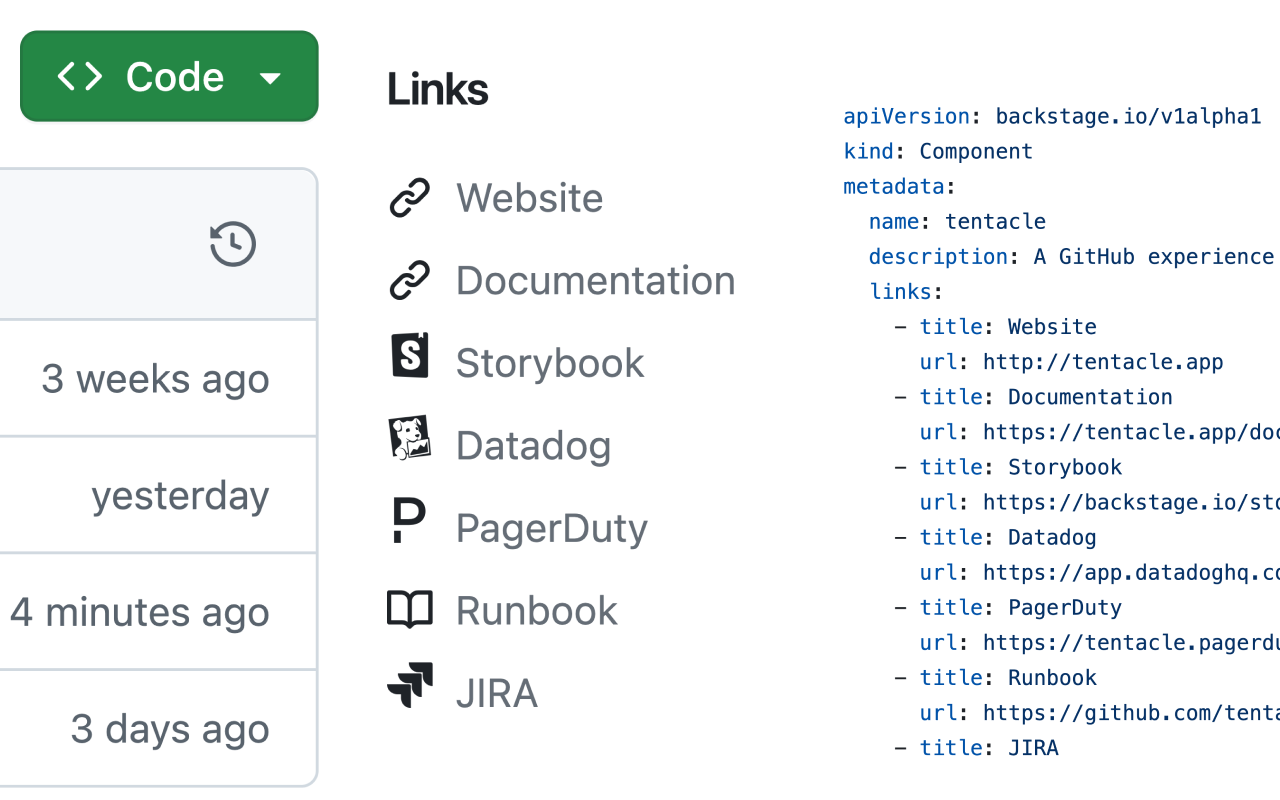
Tentacle is a browser extension designed to enhance the GitHub experience for development teams. It offers a seamless way to add links within your repositories and pull requests, making it easier for team members to access important resources and information.
 ### Main Features
Tentacle main featues include:
For teams already using Backstage, Tentacle provides immediate benefits without any additional setup required.
Tentacle automatically detects the `catalog-info.yaml` file in your repository's root directory. It then reads the specified links and generates a new UI element that integrates smoothly into your GitHub interface.
Tentacle surfaces the links defined in the `metadata.tentacle.pullRequestLinks` section of the `catalog-info.yaml` file, providing your team with context-specific resources in the pull request view.
By centralizing important links, Tentacle helps your team quickly find what they need, reducing time spent searching for resources and improving overall productivity.
### Main Features
Tentacle main featues include:
For teams already using Backstage, Tentacle provides immediate benefits without any additional setup required.
Tentacle automatically detects the `catalog-info.yaml` file in your repository's root directory. It then reads the specified links and generates a new UI element that integrates smoothly into your GitHub interface.
Tentacle surfaces the links defined in the `metadata.tentacle.pullRequestLinks` section of the `catalog-info.yaml` file, providing your team with context-specific resources in the pull request view.
By centralizing important links, Tentacle helps your team quickly find what they need, reducing time spent searching for resources and improving overall productivity.